
Quick Overview
Most nonprofit and association leaders assume their website is being maintained. Most are not receiving what they believe they are paying for. WordPress maintenance is a structured monthly process, not an automated background task. requiring human judgment, verified backups, staged testing environments, and documented reporting. This guide explains what professional maintenance looks like, what your agency should be doing on your behalf every month, and how to evaluate whether it is actually happening.
Is Your Website Really Working?
Your website is live. You are paying a monthly retainer. You assume maintenance is happening.
For many nonprofit and association leaders, that assumption is never tested until something breaks. A donation form stops working during a year-end campaign. A security incident takes the site offline. A page that used to load in two seconds now takes seven. And when you ask your agency what happened, the answer is usually some version of: “We didn’t catch it in time.”
Professional website maintenance is not automatic. It is not what your hosting provider does. It is not an automated backup service running in the background. It is a structured, monthly process that requires human attention, documented results, and clear communication.
According to Patchstack’s State of WordPress Security in 2026 report, 91% of compromised WordPress sites were running outdated plugins, and 9% had vulnerabilities in outdated themes. These are maintenance failures, not sophisticated attacks. Hackers do not target specific organizations. They scan the internet continuously for software that has not been updated, and they exploit it within hours of a vulnerability being disclosed.
The question is not whether your website needs maintenance. It does. The question is whether you are actually receiving it.
What Professional Maintenance Actually Looks Like
The gap between what organizations expect from a maintenance retainer and what they are actually receiving is one of the most consistent sources of friction in agency-client relationships.
Most organizations expect: someone will fix things if they break.
Professional maintenance is: structured monthly work that prevents things from breaking.
The distinction matters because reactive maintenance is expensive and stressful. Proactive maintenance is predictable and documented. When an agency cannot hand you a written report at the end of each month showing exactly what was done and what was found, you are paying for hope, not maintenance.
Here is what professional WordPress maintenance includes, translated into plain language for organizational leaders.
The 12 Monthly Maintenance Tasks Your Agency Should Complete
1. Confirm Backups Are Running and Verified
Your agency should verify every month that automated daily backups completed successfully, are stored off-site (not just on your hosting server), and have actually been tested by restoring them to a staging environment to confirm the site loads and all content is intact.
Why it matters to you: If your site goes down or is compromised, the backup is how it gets restored. An untested backup is an assumption. Backup failures are almost always discovered during actual emergencies. If your agency cannot confirm when the last restore test was completed, your backup is unverified.
What to ask your agency: When was the last time you restored a backup to a test environment and confirmed it worked?
2. Run Security Scans and Review Alerts
Your agency should run a malware scan, review any security alerts generated during the month, and confirm that no unauthorized changes were made to your site’s files or user accounts.
Why it matters to you: WordPress powers 43% of all websites on the internet, which makes it the most-targeted platform for automated attacks. Malware can be present on a site without any visible signs (running in the background, redirecting traffic, or collecting form submissions) for weeks before it is detected. Professional security scanning catches these issues early.
What to ask your agency: What security scanning tool do you use, and what did last month’s scan find?
3. Check Uptime Monitoring
Your agency should review uptime monitoring logs to confirm the site was accessible throughout the month, and document any downtime events, including what caused them and how quickly they were resolved.
Why it matters to you: M+R Benchmarks 2025 shows approximately 5% of annual nonprofit online revenue arrives on December 31 alone. A site that is down for four hours on a peak giving day is a revenue loss with no recovery path. Uptime monitoring tells you whether that risk is being tracked.
What to ask your current agency: What was our site’s uptime percentage last month, and were there any downtime events?
4. Update WordPress Core, Plugins, and Themes — With Testing
Your agency should update WordPress core software, all active plugins, and all themes on a documented monthly schedule. These updates should be applied first to a staging environment (a private copy of your site), tested to confirm everything works correctly, and only then applied to your live site.
Why it matters to you: Updates close security vulnerabilities. The reason this task requires human attention rather than automation is that updates sometimes break functionality: a donation form stops processing, a layout breaks on mobile, a third-party integration stops working. Testing in staging catches these issues before your visitors do. An agency applying updates directly to your live site without a staging environment is taking a risk with your site’s uptime.
What to ask your current agency: Do you test updates in a staging environment before applying them to our live site?
5. Verify Site Functionality After Updates
After updates are applied, your agency should run a functional check of your site’s most critical paths, confirming that contact forms submit, donation flows process, member login works, and key pages load without errors.
Why it matters to you: An update can pass a visual inspection and still break a critical process. Form submissions that silently fail, donation processing that errors on the final step, and navigation menus that collapse on mobile are all real post-update failure modes that a functional verification catches.
What to ask your agency: What does your post-update verification process include?
6. Clear Cache
Your agency should clear your site’s cache (the stored version of your pages served to visitors) after any significant updates or content changes, and verify that visitors are seeing the current version of the site.
Why it matters to you: Caching is what makes websites load quickly. A stale cache serves outdated content to visitors, a problem particularly acute after a site update, a campaign launch, or a content correction. Your agency should use a caching management tool (Black Digital uses WPRemote with Airlift for caching, optimization, and lazy loading) and document when cache clears occur.
What to ask your current agency: How do you manage caching, and when do you clear it?
7. Optimize the Database
Your agency should run a monthly database optimization to remove accumulated data that slows your site: stored page revisions, spam comment records, expired temporary files, and tables left behind by removed plugins.
Why it matters to you: Databases accumulate junk the same way a computer’s hard drive slows down over time. A bloated database means slower page load times for every visitor, including the donor filling out a contribution form or the prospective member reviewing your program pages. Database optimization is a routine maintenance task that takes 20 minutes and produces measurable speed improvements. Black Digital uses WP DB Cleaner and WP Sweep for this process.
What to ask your current agency: How often do you optimize our database, and what does that process include?
8. Review and Remove Unused Plugins and Themes
Your agency should audit active and inactive plugins monthly, remove anything that is no longer in use, and maintain a registry of what each active plugin does and why it is installed.
Why it matters to you: Every plugin on your site, including ones that are installed but inactive, adds security surface area. Unused plugins are frequently the entry point for compromised sites because they are not updated after they are deactivated. A professional agency limits active plugins to what is necessary (typically 10–15), removes unused ones entirely, and documents why each active plugin exists. Admin and Site Enhancements (ASE) is one tool agencies use to manage this efficiently.
What to ask your current agency: How many active plugins does our site have, and when did you last audit and remove unused ones?
9. Review Site Performance Metrics (Core Web Vitals)
Your agency should check your site’s performance scores monthly using tools like Google PageSpeed Insights and GTMetrix, track them over time, and flag any degradation that requires attention.
Why it matters to you: Google’s Core Web Vitals scores (which measure how quickly your pages load, how quickly they respond to user interaction, and how visually stable they are) directly affect your search rankings and your visitors’ experience. Research from Portent found a site that loads in one second converts at three times the rate of a five-second site. Performance decay is gradual and invisible without monitoring.
What to ask your current agency: What are our current Core Web Vitals scores, and how have they trended over the past three months?
10. Audit User Access and Inactive Accounts
Your agency should review all user accounts on your site monthly, remove accounts for staff or contractors who are no longer with your organization, and verify that user permission levels match current roles.
Why it matters to you: Every user account on your website is a potential entry point for attackers. Former employees, contractors from completed projects, and accounts created for temporary access that were never removed are common sources of unauthorized access. A monthly audit catches these gaps. No former vendor or past employee should retain administrative access to your organization’s website.
What to ask your current agency: When did you last audit our user accounts, and how many active admin accounts does our site currently have?
11. Monitor Login Activity and Block Unauthorized Access
Your agency should review login attempt logs, identify and block IP addresses attempting unauthorized access, and confirm that rate limiting is active to prevent brute-force attacks.
Why it matters to you: Brute-force attacks (automated tools repeatedly guessing passwords) are among the most common attack types against WordPress sites. Rate limiting (automatically blocking an IP address after a defined number of failed login attempts) stops the vast majority of these attempts before they succeed. Geo-blocking adds an additional layer, restricting access from high-risk geographic sources. Your agency should be able to show you whether these protections are active.
What to ask your current agency: Are rate limiting and geo-blocking enabled on our site? What did login monitoring show last month?
12. Verify SEO Fundamentals
Your agency should confirm monthly that your site’s core SEO infrastructure is intact: title tags and meta descriptions on key pages, XML sitemap accuracy, Google Search Console status, and schema markup validity.
Why it matters to you: Small SEO problems compound quietly over time. A misconfigured robots.txt file can accidentally block search engines from indexing your site. An expired sitemap stops telling Google about new pages. A broken schema markup tag removes your organization from AI-generated search summaries. These are not dramatic failures — they are gradual, invisible erosions of your online visibility that a monthly check catches early.
What to ask your current agency Do you review Google Search Console monthly, and what did last month’s check show?
What a Monthly Maintenance Report Should Look Like
If your agency is completing the 12 tasks above, they should be able to give you a written summary at the end of every month. This distinction separates professional maintenance from reactive support.
A professional monthly report includes:
- Security and updates: what was updated, what was found, what was resolved
- Backup status: confirmation that backups ran and the most recent restore test results
- Performance: Core Web Vitals scores and any changes from the prior month
- Uptime: percentage and any downtime events
- User access: any accounts reviewed, removed, or flagged
- SEO health: any crawl errors, broken links, or index issues
If your current agency cannot produce this report, you do not have a maintenance plan. You have a reactive support arrangement.
This distinction is not semantic. Organizations paying for reactive support discover problems after they affect donors, members, and site visitors. Organizations paying for proactive maintenance receive documentation that problems were caught before anyone noticed.
How to Evaluate Your Current Vendor
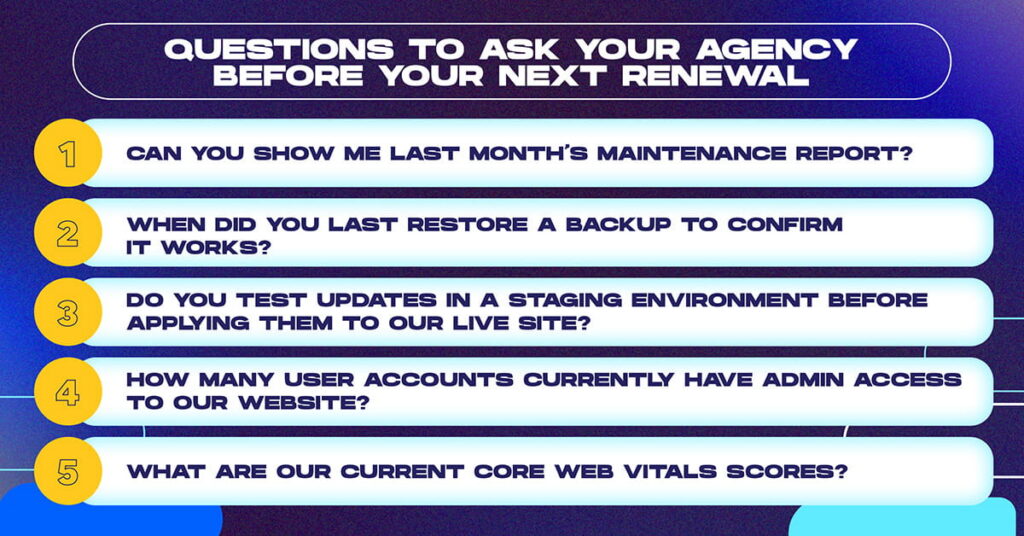
Before your next renewal conversation, ask these five questions:
- Can you show me last month’s maintenance report?
- When did you last restore a backup to confirm it works?
- Do you test updates in a staging environment before applying them to our live site?
- How many user accounts currently have admin access to our website?
- What are our current Core Web Vitals scores?
If your agency cannot answer all five clearly and specifically, the maintenance you are paying for is not the maintenance you are receiving.
What Professional Maintenance Costs
Black Digital’s website Care Plans are structured around organizational need and site complexity. Every plan includes the 12 monthly maintenance tasks described above, a written monthly report, and defined response time SLAs for urgent issues.
Care Plan pricing reflects the actual cost of doing this work correctly: a human being who understands your site, tests every update, verifies every backup, and documents the work for your records. Hosting fees are not maintenance. Automated tools are not maintenance. A professional care plan is maintenance.
Frequently Asked Questions
What is the difference between hosting and website maintenance?
Hosting keeps your server running and your site accessible. Maintenance keeps the site secure, performant, compliant, and current. Hosting providers do not update your plugins, optimize your database, test your backups, audit your user accounts, or monitor your login attempts. These are the agency’s responsibility and should be explicitly scoped in a care plan or maintenance retainer.
What happens if WordPress plugins are not updated?
Unpatched plugins are the most common cause of WordPress compromises. Patchstack’s 2026 report found 91% of compromised sites were running outdated plugins. Vulnerabilities are disclosed publicly, meaning attackers know exactly which plugin versions are vulnerable and can scan the entire internet for affected sites within hours of disclosure. Updates close that window.
How do I know if my backups actually work?
Backups only work if they have been restored and tested. Ask your agency directly: when did you last restore our backup to a test environment and confirm the site loaded correctly? If they cannot answer with a specific date and result, your backup has not been tested.
Can I handle WordPress maintenance myself?
The technical tasks in a professional maintenance workflow (staging environment testing, database optimization, security log review, backup restoration testing, user access audits) require both technical knowledge and significant time. Most organizational leaders lack the technical fluency to do this safely, and most communications staff do not have the capacity to do it consistently. Organizations that attempt self-maintenance typically perform the visible tasks (updating plugins through the admin dashboard) while missing the consequential ones (testing updates before applying them, verifying backups, reviewing security logs).
How much should we budget for professional website maintenance?
Black Digital’s care plans range from $550 to $2,800 per month depending on site complexity, traffic, and service scope. For context: a single security incident requiring emergency remediation typically costs $3,000–$10,000. An ADA accessibility lawsuit filing carries settlement costs that typically range from $5,000 to $75,000. Professional maintenance is a risk management investment, not a technical overhead cost.
What tools does Black Digital use for WordPress maintenance?
Black Digital uses WPRemote as the primary platform for backup management, security scanning, uptime monitoring, updates, and performance reporting, including Airlift for caching, optimization, and lazy loading. We use WP DB Cleaner and WP Sweep for database optimization, Google PageSpeed Insights and GTmetrix for performance monitoring, and Google Site Kit for analytics integration. We use ASE (Admin and Site Enhancements) for plugin management and site optimization.
What is geo-blocking and does my nonprofit need it?
Geo-blocking restricts access to your WordPress admin area from geographic regions that generate a disproportionate share of automated attack traffic. It is a layer of protection rather than a complete security solution. For most nonprofits and associations, the administrative benefit of limiting login access from high-risk sources outweighs any organizational need for global admin access. Black Digital enables geo-blocking as part of our security hardening process.
Ready to Know Your Site Is Actually Being Maintained
Black Digital’s website Care Plans give nonprofit, association, higher education, and mission-driven organization leaders something most are not currently receiving: documented proof that their site is being maintained correctly, every month, by a team that understands what is at stake.
If you are currently paying for maintenance and cannot remember the last time you received a written report, it is worth finding out what you are actually getting.
Start with our free nonprofit website health check. It takes less than five minutes and gives you a baseline assessment of your current site’s security, performance, and structural health before any conversation about ongoing care.
Or schedule a 30-minute maintenance strategy audit. We will review your current retainer scope, identify gaps between what you are paying for and what is being delivered, and outline what a professional care plan would look like for your organization.