
Quick Overview
Website maintenance is not a technical line item. For nonprofits, associations, and higher education institutions operating with lean teams and high public accountability, it is business continuity infrastructure. It protects fundraising revenue, manages legal exposure, sustains search performance, and increasingly determines whether your organization is visible in an AI-driven search landscape. Skipping it defers and compounds the cost rather than eliminating it.
Don’t Skip Your Website Maintenance!
Your website launched. The project is done. And unless something visibly breaks, the budget for ongoing maintenance feels hard to justify.
This is one of the most expensive decisions mission-driven organizations make — and most do not realize it until the cost is already in motion.
The wrong question is “what does maintenance cost per month?” The right question is “what is at risk without it?”
For a nonprofit that raises $1 million online annually, M+R Benchmarks 2025 data shows approximately 5% of that revenue arrives on December 31 alone — roughly $50,000 in a single day. If a botched update, an expired SSL certificate, or a security incident takes the site offline on that day, that revenue does not trickle in later. Donors who cannot give on the day they intended to give rarely come back.
What Most Leaders Get Wrong About Maintenance
“The site looks fine” is not a reliable signal. Security vulnerabilities, performance degradation, broken forms, and accessibility gaps are largely invisible to non-technical users. You will not see a plugin vulnerability in your analytics. You will not know your donation page is abandoning 30% more visitors because of a two-second load time delay. You will not know your site is hosting malware until Google flags it as unsafe.
Hosting is not maintenance. A hosting provider keeps your server running. It does not update your CMS, manage your plugins, test your forms, monitor your accessibility, optimize your performance, or verify that your donation integrations still function after a third-party API update.
Auto-updates are not a strategy. For a personal blog, automated plugin updates are a reasonable shortcut. For an organization whose website processes donations, member applications, or enrollment inquiries, unmonitored auto-updates are a liability. Updates not tested in a staging environment can break functionality, alter layouts, disrupt integrations, and trigger conflicts — often at 2 AM, when nobody is watching.
Small organizations are not exempt. According to NonProfit PRO’s cybersecurity reporting, 97% of WordPress attacks are automated. Bots scan indiscriminately for outdated software, weak credentials, and unpatched plugins. Organizational size is irrelevant to automated attackers.
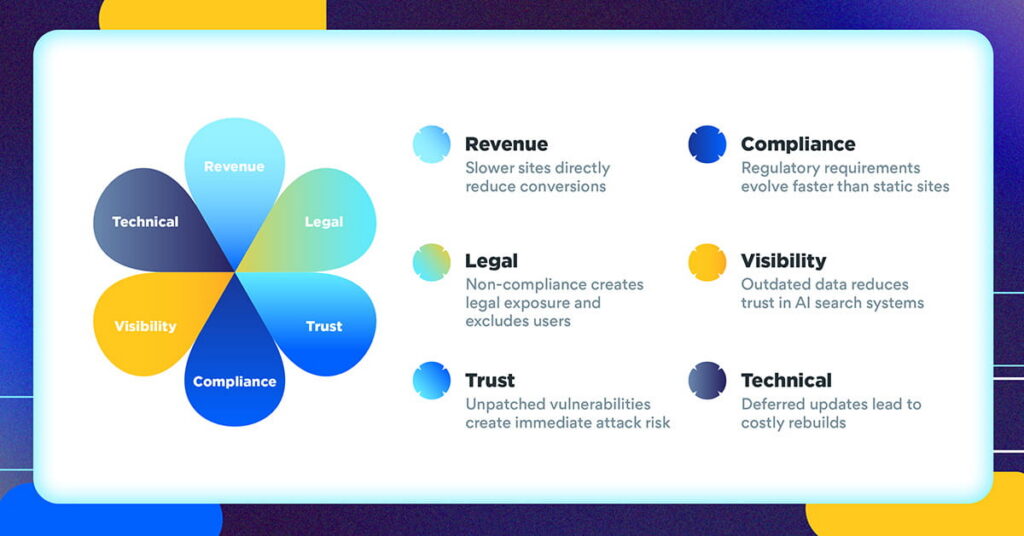
Six Compounding Risks of Deferred Maintenance
1. Security Exposure
Patchstack’s State of WordPress Security in 2026 report documented 11,334 new vulnerabilities in the WordPress ecosystem in 2025, a 42% increase over the prior year. In 2024, 96% of those vulnerabilities originated in plugins and themes, not WordPress core — meaning every unmanaged plugin on your site is a potential entry point.
According to IBM’s Cost of a Data Breach Report 2024, the average data breach costs $4.88 million globally, with an average of 194 days before detection. For nonprofits specifically, breach costs are lower but still devastating — and the trust damage is compounded by donor relationships. The Give.org Donor Trust Report 2025 found that 79.8% of donors would stop giving immediately or pause their support after learning of a data breach at an organization they supported.
Attackers begin exploiting publicly disclosed vulnerabilities within hours of disclosure. The gap between disclosure and patching is where most successful attacks happen — and proactive maintenance closes that gap.
2. Performance Decay and Revenue Loss
Website performance degrades over time without active management. Unoptimized images accumulate. Plugin overhead compounds. Databases bloat.
Research from Portent found that a website loading in one second converts at three times the rate of a five-second site (for B2B sites; 2.5x for e-commerce). Google’s own research confirms that 53% of mobile users abandon a page if it takes more than three seconds to load, and each additional second of load time costs approximately 4.42% in conversions.
For nonprofits, where M+R Benchmarks 2025 shows donation page completion rates average just 12%, a two-second performance gap is not a technical issue. It is a fundraising problem.
3. Accessibility Risk and Legal Exposure
ADA website accessibility lawsuits increased 37% in the first half of 2025, with more than 2,000 federal filings in that period. Settlements typically range from $5,000 to $75,000, plus remediation costs.
The regulatory landscape shifted materially in 2024. The Department of Justice finalized its Title II rule, requiring all public entities — including public colleges, school districts, and organizations receiving federal funding — to meet WCAG 2.1 AA accessibility standards by April 24, 2026.
Two points matter here. First, one-time accessibility audits do not create ongoing compliance. New content, updated plugins, and CMS changes introduce barriers regularly. Compliance requires continuous monitoring. Second, accessibility overlay widgets are not solutions. 22–25% of current ADA lawsuits now target websites that have overlay widgets installed, and the FTC fined one major overlay provider $1 million in January 2025 for deceptive marketing claims.
According to the CDC, adults with disabilities represent 26% of the U.S. adult population. Websites with accessibility barriers are both legal risks and structural barriers to the communities nonprofit missions exist to serve.
4. Compliance Accumulation
Privacy and payment compliance requirements are not static. According to IAPP, 20 U.S. states now have comprehensive privacy laws in effect with varying consent, data handling, and breach notification requirements. PCI DSS 4.0.1, mandatory since March 2025, requires organizations with embedded payment forms to inventory every script running on payment pages and implement tamper-detection monitoring. Many nonprofits using embedded Stripe, PayPal, or third-party donation platforms are likely already non-compliant.
Maintenance is how organizations stay current with these requirements without rebuilding from scratch each time a new standard takes effect.
5. AI Search Visibility Erosion
More than 65% of searches now end without a click, as users get answers directly from AI-generated summaries in Google, ChatGPT, and Perplexity. Being cited in those summaries is now a material business outcome — and being cited requires current, accurate schema markup.
According to Ahrefs’ research on AI search overlap, only 12% of pages ranking in Google’s top 10 results are also cited in AI-generated answers. Traditional SEO rank and AI visibility are different measurements requiring different maintenance practices. Schema markup must be current, accurate, and consistent with on-page content. Stale dates, outdated staff listings, and incorrect organizational information actively reduce AI trust in a site as a reliable source.
For organizations that depend on organic search to drive donor acquisition, enrollment inquiries, or membership growth, vanishing from AI search is a slow-moving crisis that compounds quietly over months.
6. Platform Decay and Technical Debt
Without active platform maintenance, websites age in ways that become progressively harder and more expensive to reverse. According to HackerTarget’s PHP end-of-life tracking, 55% of PHP-powered websites are currently running end-of-life software, receiving no security patches for newly discovered vulnerabilities. The compounding effect: deferred maintenance creates technical debt that eventually forces a choice between emergency remediation at high hourly rates or a full website rebuild. A nonprofit website rebuild typically runs $10,000–$40,000. Proactive monthly maintenance at $200–$500/month prevents that outcome.
What Good Maintenance Actually Looks Like
Most organizations have never seen a competent maintenance plan in practice. Here is what separates professional maintenance from checkbox maintenance.
Staging-based updates.
Updates to plugins, themes, and CMS core are tested in a staging environment before being applied to the live site. This is the single most consequential operational difference between low-cost and professional maintenance.
Verified backup and recovery.
Backups run daily, are stored off-server, and have been tested for restoration. A backup that has never been restored is an assumption, not a safeguard.
Security stack depth.
Professional maintenance includes a Web Application Firewall, malware scanning, and an included response plan for when a problem is found — not just detection.
Performance monitoring.
Core Web Vitals are tracked monthly. As of mid-2025, only 48% of mobile websites pass all three Core Web Vitals. Maintained sites that do pass have a material advantage in both traditional and AI search.
Accessibility monitoring.
WCAG compliance is scanned regularly and issues are tracked and remediated. Manual audits complement automated scanning, which detects only about 30% of WCAG issues on its own.
Meaningful reporting.
Leadership receives a monthly report covering uptime, security, performance, accessibility status, and key traffic or conversion indicators. Reporting is what makes maintenance visible, justifiable, and connected to business outcomes.
The Investment Comparison That Changes the Conversation
Consider a nonprofit with $800,000 in annual online revenue, a December campaign accounting for 22% of that total, and no current maintenance plan. Using conservative benchmarks:
- A four-second mobile load time versus a two-second baseline costs approximately 8.84% in conversions — roughly $14,000–$17,000 annually in attributable revenue loss, before any incident
- A single year-end security incident with four hours of downtime eliminates $7,300–$15,000 in peak-period revenue
- An ADA lawsuit filing, even one that settles quickly, carries $5,000–$75,000 in settlement costs plus $10,000–$50,000 in remediation
A professional maintenance plan for an organization of this size runs $2,400–$6,000 per year. The math resolves clearly. The question is not whether maintenance is affordable. It is whether the organization can sustain the compounding cost of not maintaining.
What to Do Now
Commission a technical audit before your next major campaign.
A qualified audit assesses security posture, performance baselines, accessibility compliance gaps, and schema accuracy — and translates findings into business risk language leadership can act on. Black Digital’s free nonprofit website health check is a starting point for understanding your current baseline.
Distinguish maintenance from support before signing a contract.
Ask any prospective provider directly: what tasks are automated and what require a human? What is your response time for critical issues? Is malware removal included or billed separately? Do you test updates in staging? What does my monthly report cover?
Treat the April 2026 DOJ accessibility deadline as a hard decision point.
If your organization is a public entity or receives federal funding, WCAG 2.1 AA compliance is required: an audit, a remediation plan, and ongoing monitoring. A widget is not a solution.
Connect maintenance to your AI search strategy.
If your organization depends on organic search for donor acquisition, student recruitment, or membership growth, schema markup and content freshness are now operational requirements. Both require maintenance processes.
Frequently Asked Questions
How much does professional nonprofit website maintenance cost?
Professional maintenance typically runs $200–$500/month for most nonprofit and association websites, covering staging-tested updates, backups, security monitoring, performance tracking, accessibility scanning, and monthly reporting. Budget-tier services exist for less but typically exclude staging environments, malware response, and meaningful reporting.
What is the difference between hosting and maintenance?
Hosting keeps your server running and your site accessible. Maintenance keeps the site secure, performant, compliant, and current. Hosting providers almost never include plugin updates, accessibility monitoring, performance optimization, or security response. Organizations frequently conflate the two until something breaks.
Is my nonprofit legally required to have an accessible website?
If your organization is a public entity (government, public university, school district) or receives federal funding, the DOJ’s Title II rule establishes WCAG 2.1 AA compliance as a legal requirement by April 24, 2026. For private nonprofits, ADA Title III lawsuits have been filed and won against organizations in the absence of a specific federal mandate. Consult your legal counsel on your specific exposure.
How do I know if my site has security vulnerabilities?
Start with a free scan from Wordfence or Sucuri SiteCheck. These tools surface known malware and some plugin vulnerabilities. A professional security audit goes deeper — checking plugin versions against known vulnerability databases, reviewing server configuration, and testing authentication. Black Digital’s free website health check covers the most critical indicators.
What should be in a monthly maintenance report?
At minimum: uptime percentage, security scan results, plugin and theme update log, backup verification, Core Web Vitals scores, and any accessibility issues flagged. High-quality reports also include traffic trends, top-performing pages, and any recommended actions for the following month.
Ready to Protect What You Have Built
Black Digital works with nonprofits, associations, higher education institutions, and mission-driven organizations to maintain the web infrastructure that supports fundraising, enrollment, membership, and mission delivery.
If your organization is operating without an active maintenance plan, has not conducted a security or accessibility audit in the past 12 months, or relies on auto-updates without staging-based testing, we can help you assess your current risk and build toward something sustainable.
Schedule a free 30-minute web strategy conversation. We will review your current maintenance posture, identify your highest-priority risks, and outline what a professional maintenance program would look like for your organization.
Book a Free Strategy Session →
Or start with our free nonprofit website health check.