
Overview
Arts and history organizations hold decades of footage (galas, performances, panels, community interviews) that remains dormant on hard drives. The barrier is not a lack of material. It is a lack of systems for identifying what is worth surfacing and a workflow for transforming it into platform-ready content. AI-powered tools like OpusClip and Descript have narrowed that gap considerably. With a structured archive audit and an AI-assisted editing workflow, a two-hour recording from 1998 can produce a week of short-form content that performs on TikTok, Instagram Reels, and YouTube Shorts, with no dedicated video team required.
Your Archive Is Your Content Engine
Most cultural institutions treat their archives as preservation assets. The shift to treating them as production assets requires a systems change. Budget is rarely the constraint.
A performing arts organization sitting on 20 years of recorded galas, artist interviews, and backstage footage is resource-rich and system-poor. The footage exists. The stories are there. What is missing is a repeatable process for moving material from storage to publication.
Without a defined workflow, archive footage stays dormant because no one has been assigned the task of mining it. Until recently, the tools to do so efficiently did not exist. That has changed.
AI-assisted video tools now allow a solo communications manager to accomplish in two hours what previously required a video editor, a producer, and a full day of post-production. The bottleneck has shifted from capability to decision-making: knowing which material to surface, how to sequence it, and where to publish it.
Why the Archive Problem Is a Strategy Problem
The American Alliance of Museums’ 2025 National Snapshot documented that 55% of museums report lower attendance than 2019, with 34% experiencing canceled government grants and 67% unable to replace lost federal funding through other sources. Against that backdrop, producing new content at scale with constrained budgets is not realistic for most organizations.
But existing content, decades of it, is a different calculation.
Colleen Dilenschneider, whose IMPACTS Experience firm has tracked cultural organization digital engagement across clients including Monterey Bay Aquarium, the National Park Service, and UNESCO, documented a permanent behavioral shift after the pandemic: people now spend significantly more time engaging with cultural content digitally than they did before 2020. Scaling back digital investment misses an audience that is actively looking for what arts organizations have.
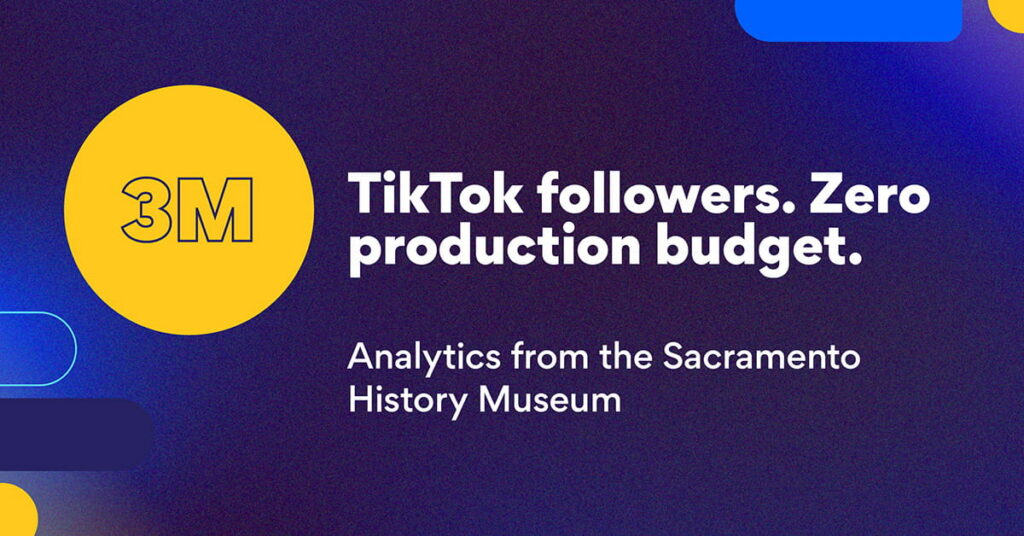
That audience is also on platforms that reward exactly the kind of content archival footage produces: authentic, historically grounded, community-rooted. The Sacramento History Museum, previously described as “unknown even to native Sacramentans” by NPR reporting — leveraged a single staff member demonstrating historic printing presses on TikTok to accumulate 3 million followers and 49.9 million likes. Post-reopening visitor numbers rose significantly, with many visitors citing TikTok as how they discovered the museum.
The content was archival in nature: techniques, tools, and practices from the past demonstrated and explained by a practitioner. It required no production budget. It required a system.
Step 1: The Archive Audit — Identifying High-Impact Footage
Before any tool is opened, the work is curatorial. Not every recording deserves repurposing. The archive audit identifies footage with the highest narrative and performance potential.
What to look for in archival footage:
- Emotional peaks: applause moments, standing ovations, audience reactions, tearful acceptance remarks. These are the clips that stop a scroll.
- Milestone moments: groundbreakings, anniversaries, first performances, notable guest appearances. These carry built-in significance.
- Community voices: testimonials from patrons, board members, artists, or community participants. First-person accounts are among the most shareable content any organization can produce.
- Contextual contrast: footage that visually illustrates before-and-after (a neighborhood, a program, a building) creates compelling narrative arcs.
The practical audit process:
Inventory all recorded assets by decade and event type. A simple spreadsheet with columns for year, event name, format (VHS, DVD, digital file), estimated runtime, and a two-to-three sentence content description is sufficient for this stage.
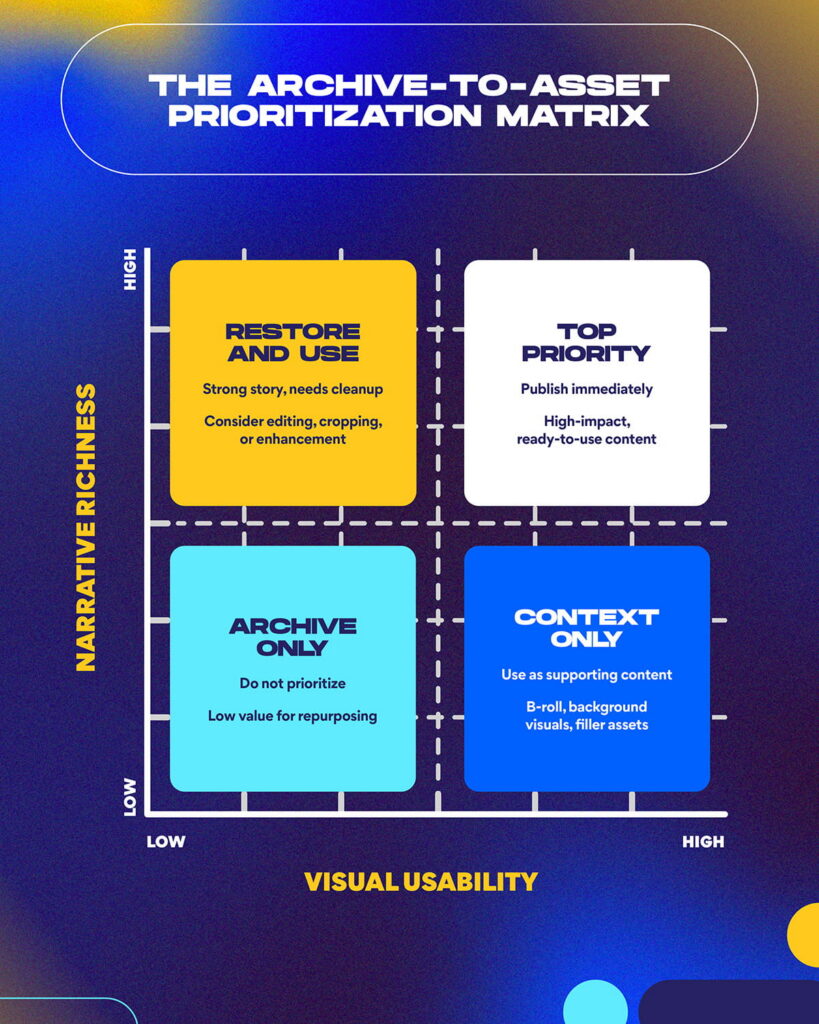
Score each asset on two axes: narrative richness (does it contain a compelling story?) and visual usability (is the quality recoverable with basic cleanup?). Flag the top 20% for immediate repurposing. This becomes your first content sprint.
A 90-minute gala recording from 2003 may contain three minutes of footage worth publishing. The audit identifies those three minutes before any processing begins.
Step 2: The AI Editing Workflow — Turning Historic Footage Into Platform-Ready Content
Once high-priority material is identified, two tools handle most of the production work.
Descript: Text-Based Editing for Archival Precision
Descript converts video into an editable transcript. Editors work with words, not timecodes, a significant advantage for archival footage where the value is embedded in dialogue: an artist discussing their craft, a founder explaining the organization’s origin, a community member describing what a program meant to their family.
Key workflow applications for archive work:
- Auto-transcription surfaces quotable moments across hours of footage in minutes
- Scene detection flags natural break points in longer recordings
- Audio cleanup removes filler words, background noise, and artifacts from older recordings, recovering footage that would otherwise be unusable
- Built-in repurposing features identify highlight segments and prepare them for export as short-form clips
For organizations with VHS-era or early digital footage, Descript’s noise reduction tools frequently recover recordings that visual inspection would write off. Descript has been used by more than 7 million creators and has processed over 200 million minutes of audio and video.
OpusClip: Reformatting Historic Footage for Vertical Platforms
The single biggest technical barrier to repurposing archival footage is format. Most recordings before 2016 were captured in 16:9 horizontal format. TikTok, Instagram Reels, and YouTube Shorts are vertical: 9:16.
OpusClip’s ReframeAnything feature addresses this automatically. Its AI identifies the primary subject in each frame and recenters the vertical crop dynamically, tracking movement throughout the clip. A 1990s panel discussion filmed in standard broadcast format can be reformatted to mobile-native vertical video without manual keyframing.
Beyond reformatting, OpusClip’s ClipAnything model analyzes visual content, audio sentiment, and contextual cues to identify the highest-engagement moments in a longer video. Users can prompt the system in natural language: “Find the moments where the speaker describes community impact” or “Identify applause moments and reactions.” The system returns timestamped clips ranked by predicted engagement.
AI video editing tools now save creators up to 200 hours annually, and OpusClip reports 97%+ caption accuracy across 20 languages with processing times under two minutes per clip. For a solo communications manager, those time savings are the difference between a content engine that runs and one that stalls.
The Archive-to-Asset Workflow Map
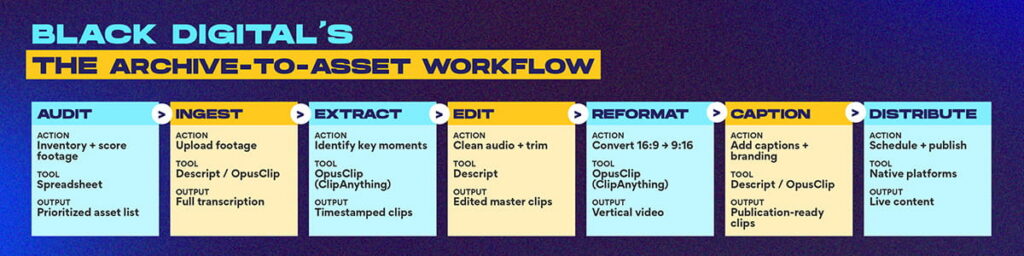
| Stage | Action | Tool | Output |
| 1. Audit | Score footage by narrative value and visual quality | Spreadsheet | Prioritized asset list |
| 2. Ingest | Upload to editing platform | Descript or OpusClip | Transcription + clip candidates |
| 3. Extract | Identify high-impact moments | OpusClip ClipAnything / Descript AI | Timestamped clip list |
| 4. Edit | Clean audio, trim, add captions | Descript | Edited master clips |
| 5. Reformat | Convert 16:9 → 9:16 | OpusClip ReframeAnything | Platform-ready verticals |
| 6. Caption | Add dynamic captions and branding | OpusClip / Descript | Publication-ready clips |
| 7. Distribute | Schedule across platforms | Native schedulers or Buffer | Published content |
A communications manager working alone can move from Step 1 to Step 7 on a single archival piece in under three hours. For organizations with a “Department of One” — a single person responsible for all marketing and communications — this workflow is the difference between publishing consistently and not publishing at all.
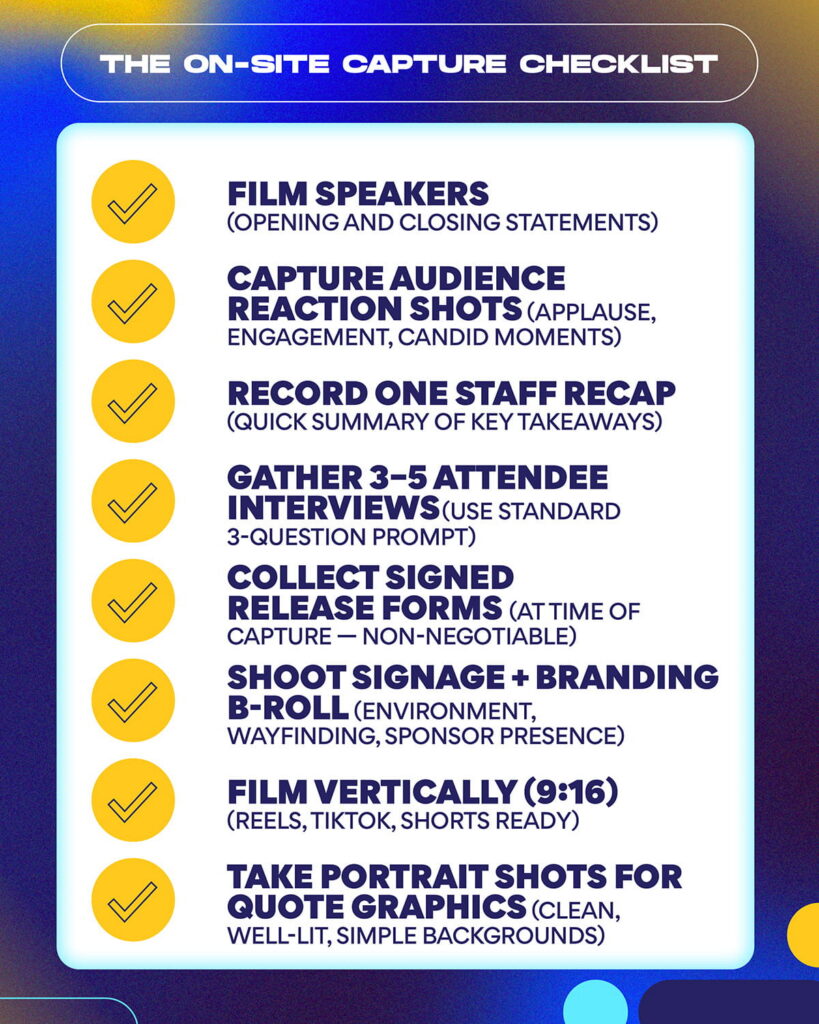
Step 3: Community Narrative Capture — Building Tomorrow’s Archive Today
Archive repurposing addresses the past. Real-time community story capture addresses the present and feeds the next decade of archival content.
Most arts and history organizations collect impact stories informally: a thank-you email here, a post-event comment card there. That material never becomes content because there is no system for capturing, tagging, and publishing it.
A functional community narrative system has four components:
Capture protocol.
A standard three-question set for post-event or post-program interviews. Three questions, recorded on a phone, produce usable footage for multiple channels:
- “What brought you here today?”
- “What does this organization mean to your community?”
- “What do you want people to know about this work?”
Release infrastructure.
A digital release form (DocuSign or equivalent) signed at the point of capture. Organizations that skip this step create archives they cannot legally use. Build the release process before the capture session.
Tagging system.
Each story is tagged by theme (community impact, artist voice, programmatic milestone), platform fit (long-form, short-form, quote graphic), and publication status (raw, edited, published, archived). This makes the asset searchable when you need it.
Publishing cadence.
A monthly content pull from tagged, approved stories. One real-time capture session per major event generates 30–60 days of distributable content when run through the AI editing workflow.
Real-time capture also solves a positioning problem: it builds a repository of first-person evidence usable in grant applications, annual reports, donor stewardship, and board presentations. The same footage that performs on Instagram can support a program narrative in a foundation grant report. Build the tagging system with both use cases in mind from the start.
What Good Performance Looks Like
Three metrics matter for every archive repurposing initiative.
Reach expansion.
Track whether archival clips are reaching audiences that live content does not. Most platforms show “new account reach” or “accounts not following” as a native metric. Archive content reaching new audiences signals discovery value, a particularly important metric for cultural organizations trying to grow beyond their existing patron base.
Engagement rate.
According to Rival IQ’s 2025 Social Media Industry Benchmark Report, which analyzed 4 million+ posts and 9 billion interactions, nonprofits achieved above-median engagement across all social channels. Reels outperformed all other post types for nonprofits on Instagram. A short-form archive clip should target a 4–6% engagement rate on Instagram Reels and TikTok within the first 48 hours. Below 2% suggests either the wrong clip was selected or the caption and hook are underperforming.
Content velocity.
Measure how many publishable clips your workflow produces per hour of source footage reviewed. A well-executed archive audit combined with AI-assisted editing should yield 8–12 publishable clips per hour of reviewed footage. Track this over time to benchmark your team’s efficiency and identify bottlenecks.
Allow 60–90 days before content velocity stabilizes and engagement benchmarks become readable. The first sprint is slower; the system becomes faster with each subsequent iteration.
Common Mistakes and How to Avoid Them
Publishing without context.
A 1994 gala clip posted without framing will confuse current audiences. Every archival clip needs a caption that anchors it in present-day relevance: “30 years ago, our founder said this. It still holds.” Context is the story.
Skipping the audit.
Teams that feed entire archives into AI tools without prioritizing first waste processing time and produce low-quality outputs. The audit is the strategy; the tools are execution.
Over-restoring.
Archival footage has texture: a grain, a warmth, a visual quality that audiences recognize as authentic. Over-cleaning removes that. Preserve the era; remove only technical defects (audio drop, hard cuts, dead air).
Missing release infrastructure.
Organizations that capture community stories without signed release forms create content they cannot publish. Build the release process before any capture session begins.
Treating repurposing as a one-time project.
Archive mining produces compounding returns only when it is an ongoing operational system, not a one-time sprint. Organizations that run a single archive push and stop miss 90% of the value.
Where Archive Repurposing Fits in Your Content Strategy
Archive repurposing multiplies the output of an existing content program rather than replacing original production. Organizations running quarterly archive sprints alongside live event coverage and real-time community story capture produce three to four times more content than those relying on live production alone, without proportionally increasing staff time or budget.
For arts and history organizations specifically, archival content carries a credibility signal that contemporary content cannot replicate: proof of longevity, community rootedness, and sustained relevance. A 30-year-old recording of a community member describing why a theater mattered to their neighborhood is more persuasive than any positioning statement an organization can write today.
The work is to surface it.
Frequently Asked Questions
What types of archival footage are most suitable for repurposing?
Footage with clear speech, emotional peaks, or milestone moments converts best. Panel discussions, community testimonials, live performance clips, and on-camera interviews are the most workable formats. VHS-era footage with severe audio degradation requires more cleanup but is often recoverable with Descript’s noise reduction tools.
How much does it cost to use these AI tools?
OpusClip’s paid plans start at approximately $15/month for individual users. Descript’s creator plan runs approximately $24/month. For a moderate archive sprint covering 10–20 hours of source footage, a monthly subscription to both tools is sufficient. Total tool cost under $50/month; staff time is the primary variable.
Do we need professional video equipment to capture new community stories?
No. A current-generation smartphone in good lighting produces footage that AI tools handle well. Consistent framing, managed ambient audio (avoid outdoor wind; use a lapel mic for long interviews), and a signed release form are the non-negotiables.
How do AI tools handle footage from the 1990s or earlier?
Reasonably well, with realistic expectations. OpusClip’s ReframeAnything converts horizontal formats to vertical with subject tracking. Descript’s audio cleanup recovers dialogue from noisy recordings. Neither tool eliminates severe degradation, but both handle common archival issues (grain, broadcast-era color, mono audio) without manual intervention.
What is the difference between Descript and OpusClip for this use case?
Descript is best for precision editing when the value is in the spoken word. OpusClip is best for fast clip identification and social reformatting. Most archive repurposing workflows benefit from using both: Descript for transcript-based editing and OpusClip for platform-ready vertical export.
How long does it take to process one hour of archival footage?
With an AI-assisted workflow, one hour of source footage can yield 8–12 publishable clips in two to three hours of total staff time, including upload, AI processing, light editing, captioning, and export. Initial setup adds two to four hours the first time.
Should archival content be posted under a separate series or integrated with current content?
Integrate it. Audiences do not distinguish “archive” from “current” in their feeds — they respond to the story. Frame archival posts with present-day context in the caption. Series labels like “From the Archives” are useful for discoverability but should not signal that the content is less relevant today.
How do we handle footage that features individuals who have since passed away?
Consult your legal counsel on applicable rights, estate considerations, and any organizational policies. Generally, footage of public performances or organizational events can be used for educational, archival, or institutional purposes, but this varies by jurisdiction and relationship. Document your review process and flag footage in this category during the audit.
What is a realistic content volume target for an organization starting out?
A reasonable 90-day target for an organization with substantial archives and one part-time staff resource is 24–36 publishable clips: roughly two to three per week. That volume sustains a consistent publishing cadence on two platforms without requiring daily production.
How does archive repurposing connect to grant reporting and donor stewardship?
Directly. Community testimonial footage tagged during the repurposing process becomes a reusable evidence base for program narratives in grant applications, annual reports, and major donor presentations. The same clip that performs on Instagram can be embedded in a funder report to demonstrate community impact. Build the tagging system with both use cases in mind from the start.
Ready to Build a Content Engine from What You Already Own
Black Digital works with arts organizations, historical societies, museums, cultural institutions, and mission-driven brands to build the content systems, archive workflows, and publishing infrastructure that turn existing assets into ongoing audience growth.
If your organization is sitting on decades of footage with no system for extracting it, if your communications capacity is stretched and original production is not realistic, or if you have never run a structured archive audit to identify what you actually have, we can help you diagnose where to start and build toward something sustainable.
Schedule a free 30-minute content strategy conversation. We will review your current content output, identify your highest-value archival assets, and outline what an AI-assisted content engine would look like for your organization.